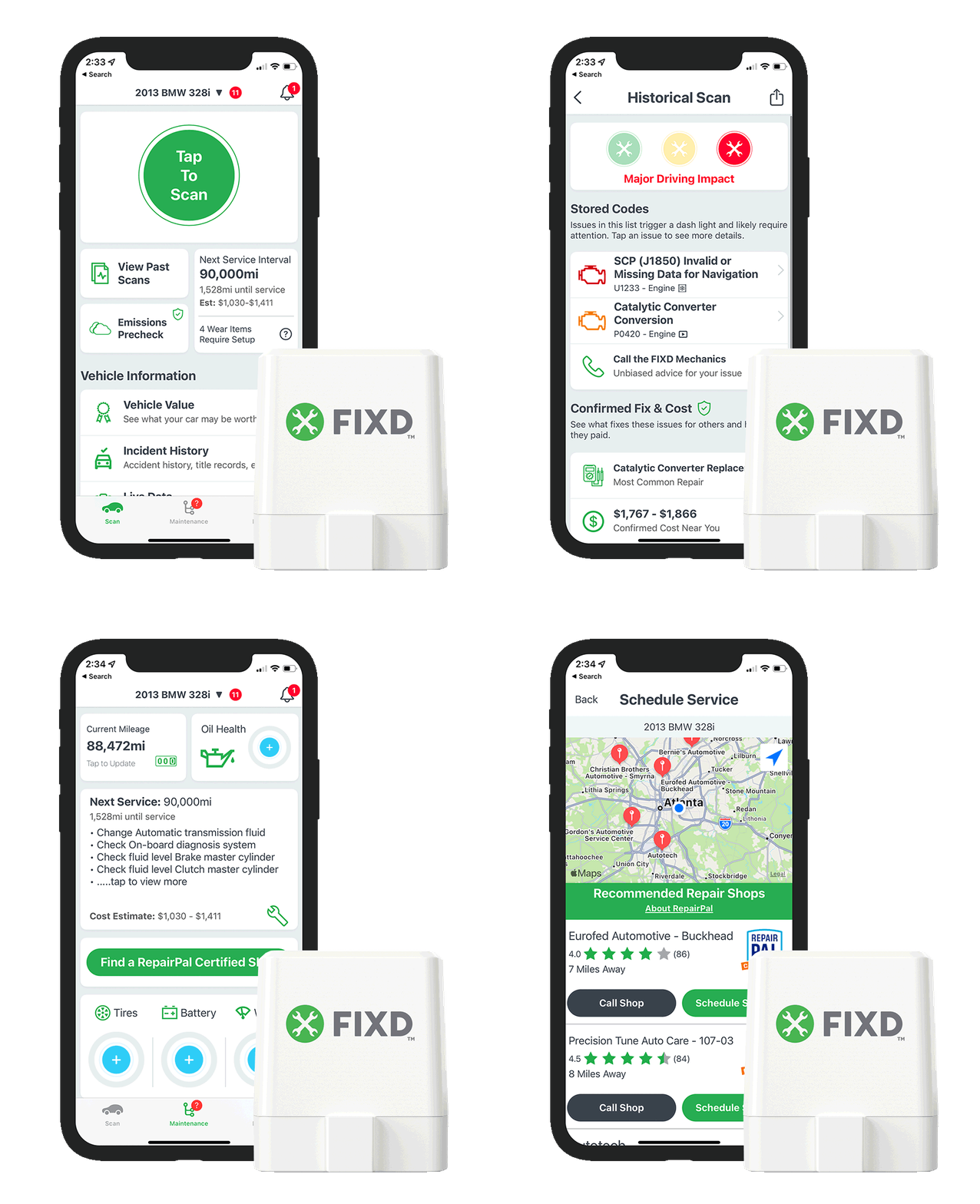
Using a FIXD OBD2 scanner is simple: plug it into your car's OBD-II port, pair it with the FIXD app on your phone via Bluetooth, and instantly view real-time diagnostics, maintenance alerts, and check engine light explanations.
I've been using OBD2 scanners for years, both professionally and on my own vehicles, and the FIXD scanner stands out as one of the most beginner-friendly tools on the market. Whether you're a car enthusiast who wants to understand what your check engine light means, or a daily driver looking to save money on unnecessary mechanic visits, this little device can be a game changer. In this guide, I'll walk you through everything you need to know about how to use the FIXD OBD2 scanner, from unboxing to interpreting diagnostic data, so you can take control of your car's health with confidence.
What Is the FIXD OBD2 Scanner and How Does It Work
The FIXD OBD2 scanner is a compact, Bluetooth-enabled device that plugs directly into your vehicle's OBD-II port. Once connected, it communicates with your car's onboard computer system and translates complex error codes into simple, easy-to-understand language through the companion FIXD app on your smartphone. Think of it as a translator between your car and you, except it speaks fluent "mechanic" so you don't have to.
The scanner works with most gasoline vehicles made in 1996 or later and most diesel vehicles from 2004 onward. It pulls data from your car's sensors in real time, monitoring everything from engine performance to emissions systems. What makes FIXD especially appealing is that it doesn't require any technical knowledge to operate. The app guides you through every step, making it perfect for people who have never looked under the hood in their life.

Unboxing and Getting Started With Your FIXD Scanner
When you first open the FIXD package, you'll find the scanner itself, which is a small, rectangular device about the size of a USB stick. There's no complicated setup or wiring involved. The design is intentionally minimalist because the real magic happens through the app.
Before you plug anything in, take a moment to download the FIXD app from the Apple App Store or Google Play Store. The app is free to download, though some premium features require a subscription. Once installed, create an account using your email address. The app will ask for some basic information, including your vehicle's make, model, and year. This helps FIXD tailor its diagnostics to your specific car, so accuracy improves right from the start.
One thing I appreciate about FIXD is how patient the onboarding process is. It doesn't assume you're a gearhead. If you've ever felt intimidated walking into an auto parts store, this device levels the playing field.
How to Locate Your Car's OBD-II Port
Finding the OBD-II port is often the part that trips people up the most, but it's actually much easier than you'd think. The port is required by law in all vehicles manufactured after 1996, so it has to be accessible without tools. In most cars, you'll find it somewhere in the driver-side footwell, either under the dashboard near the steering column, behind a small panel, or near the center console.
The port is a trapezoidal-shaped connector with 16 pins arranged in two rows. It almost looks like an old printer port, but slightly different. If you can't find it, FIXD's app includes a helpful port locator feature that shows you exactly where to look based on your specific vehicle. I've used this feature a few times when I couldn't remember the exact location in an unfamiliar car, and it saved me from crawling around the floor mats.
Step by Step Guide on How to Use FIXD OBD2 Scanner
Step 1: Plug the FIXD Scanner Into the OBD-II Port
With your car's ignition turned off, locate the OBD-II port and firmly plug the FIXD scanner into it. The device is designed to fit only one way, so you don't have to worry about forcing it. Once inserted, the scanner should light up, indicating it's receiving power from your vehicle.
Step 2: Turn On Your Vehicle's Ignition
You don't necessarily need to start the engine, but the ignition should be in the "on" position. This powers up your car's computer systems and allows the scanner to communicate with them. I usually turn the key to the accessory position or start the engine briefly to ensure everything is connected properly.
Step 3: Connect the FIXD App via Bluetooth
Open the FIXD app on your smartphone and make sure Bluetooth is enabled. The app will search for nearby FIXD devices. Once it locates your scanner, tap to pair. The first connection might take a few seconds, but subsequent connections are usually instant. I remember the first time I paired mine, I held my breath like I was defusing a bomb, only to realize it was the easiest part of the whole process.
Step 4: Run a Diagnostic Scan
Once connected, the app will automatically detect your vehicle and start gathering data. You can initiate a full diagnostic scan by tapping the "Scan" button. The scanner will check multiple systems, including the engine, transmission, airbags, ABS, and more. This usually takes less than a minute, and you'll receive a comprehensive report of any issues found.
Step 5: Interpret the Results
Here's where FIXD truly shines. Instead of showing you a confusing code like P0420, the app translates it into plain English. For example, instead of "Catalyst System Efficiency Below Threshold," you'll see something like "Your catalytic converter may not be working properly." It also tells you the severity of the issue, whether you can keep driving, and estimated repair costs.
Step 6: Clear Check Engine Light (Optional)
If the issue has been resolved or you want to reset the check engine light, FIXD allows you to clear codes directly from the app. However, I'd recommend caution here. Clearing codes without actually fixing the problem is like turning off a smoke alarm instead of putting out the fire. Always address the underlying issue before resetting the light, or you risk causing further damage.
Step 7: Set Up Maintenance Reminders
One of my favorite features is the maintenance tracking. You can input your mileage and FIXD will remind you when it's time for oil changes, tire rotations, and other routine services. This alone has saved me from missing a few critical maintenance windows, especially on vehicles I don't drive daily.

Understanding the FIXD App Dashboard
The FIXD app dashboard is designed with simplicity in mind. When you open it, you'll see several key sections:
- Current Issues: Shows active diagnostic trouble codes
- Maintenance: Tracks your service schedule
- Multi-Vehicle: Allows you to monitor multiple cars (great for families)
- History: Keeps a log of past scans and issues
- Settings: Lets you customize notifications and preferences
Each section is clearly labeled, so you don't need a manual to navigate. I particularly like the multi-vehicle feature because I can monitor both my daily driver and my weekend car from the same app, which gives me peace of mind that everything is running smoothly.
Common FIXD Scanner Uses for Everyday Drivers
Diagnosing the Check Engine Light
The most common reason people buy an OBD2 scanner is the dreaded check engine light. FIXD makes this less stressful by giving you instant insight into what's wrong. Is it a loose gas cap, or something more serious? The app will tell you in seconds, helping you decide whether to drive to the shop or handle it yourself.
Monitoring Real-Time Vehicle Health
Beyond just reading codes, FIXD continuously monitors your car's systems. If something starts going wrong while you're driving, the app can send you an alert. This proactive approach has helped me catch a failing oxygen sensor before it triggered a code, saving me from a potential breakdown on a road trip.
Saving Money on Unnecessary Repairs
Mechanics are generally trustworthy, but they also run a business. Having FIXD means you can verify their diagnoses before agreeing to expensive repairs. I've used it to confirm a mechanic's recommendation was legitimate, and just as importantly, to question a repair that turned out to be unnecessary.
Tracking Maintenance History
Keeping accurate service records is one of the best ways to maintain your car's resale value. FIXD automatically logs your scans and maintenance reminders, creating a digital history you can reference anytime. When I sold my last car, this feature gave me documentation to prove how well I'd maintained it.

FIXD OBD2 Scanner Compatibility and Limitations
FIXD works with most vehicles sold in the United States after 1996, which covers the vast majority of cars on the road today. However, there are some limitations worth noting. Electric vehicles and some hybrid models may not be fully compatible, as their diagnostic systems differ from traditional combustion engines. Additionally, while FIXD handles most common diagnostic trouble codes exceptionally well, it may not cover every single proprietary code used by luxury brands like BMW or Mercedes-Benz.
The free version of the app provides basic diagnostics, but some advanced features, like mechanic hotline access and predicted repair costs, require a FIXD Premium subscription. The subscription isn't cheap, but for someone who wants maximum support, it can be worthwhile. I've found the free version covers about 80% of what most people need, which is plenty for casual users.
Tips From My Experience Using FIXD
After years of using various OBD2 scanners, here are some practical tips I've learned that can make your FIXD experience even better:
- Keep the scanner plugged in for continuous monitoring, especially on older vehicles
- Don't ignore minor codes, as they often signal bigger issues down the road
- Use the maintenance reminders to stay ahead of costly repairs
- Check your scanner periodically to make sure it's securely connected
- Update the app regularly to access the latest features and bug fixes
One mistake I made early on was ignoring a "minor" emissions code that turned out to be a failing catalytic converter. The code didn't trigger a check engine light initially, but FIXD caught it during a routine scan. That experience taught me that this device is most valuable when you use it proactively, not just reactively.
Troubleshooting Common FIXD Issues
Sometimes technology doesn't cooperate, and FIXD is no exception. The most common issue people encounter is Bluetooth pairing problems. If the app can't find your scanner, try these steps:
- Make sure Bluetooth is enabled on your phone
- Check that no other devices are interfering
- Unplug the scanner and plug it back in
- Restart the FIXD app
- Restart your phone
If the scanner won't power on, it might not be fully seated in the OBD-II port. Remove it and reinsert it firmly. In rare cases, the port itself might have a blown fuse, but this is uncommon. I once had a scanner that wouldn't connect because the port was loose, and gently bending the connector pins back into place solved the problem.

FIXD vs Other OBD2 Scanners: Why It Stands Out
There are dozens of OBD2 scanners on the market, ranging from basic code readers to professional-grade diagnostic tools costing thousands of dollars. FIXD occupies a unique middle ground by offering professional-level insights in a consumer-friendly package. Unlike cheap code readers that just give you a number to look up, FIXD explains the problem in plain language and tells you what to do next.
Compared to more advanced scanners like the BlueDriver or Autel models, FIXD is simpler and more affordable. While those tools offer deeper diagnostic capabilities, they also come with steeper learning curves. For most everyday drivers who just want to understand their car better, FIXD hits the sweet spot of functionality and ease of use.
Safety Considerations When Using Your FIXD Scanner
Using FIXD is generally very safe, but there are a few things to keep in mind. Never plug or unplug the scanner while the engine is running, as this can potentially cause electrical issues. Also, avoid using the app while driving. Even though FIXD can display real-time data, your attention should always be on the road. If you need to check something, pull over first.
It's also worth mentioning that while FIXD tells you what's wrong, it doesn't actually fix the problem. Think of it as a doctor who can diagnose your illness but doesn't perform surgery. For repairs beyond basic maintenance, you'll still need a qualified mechanic.
Frequently Asked Questions About How to Use FIXD OBD2 Scanner
Do I need any technical knowledge to use FIXD?
No, FIXD is specifically designed for people with no technical background. The app guides you through every step, and all diagnostic information is presented in plain language that anyone can understand.
Will FIXD work on my car?
FIXD works with most gasoline vehicles from 1996 and newer and most diesel vehicles from 2004 onward. If you're unsure, you can check compatibility on the FIXD website using your vehicle's make, model, and year.
Can FIXD clear the check engine light?
Yes, the app allows you to clear diagnostic trouble codes. However, I recommend only clearing codes after the underlying issue has been fixed, as clearing them without addressing the problem can lead to further damage.
Is FIXD worth the money?
For most drivers, absolutely. The basic version is affordable, and the peace of mind it provides is well worth the investment. If you want advanced features like mechanic hotline access, the premium subscription may be worth considering.
How accurate is FIXD?
FIXD is highly accurate for most common diagnostic trouble codes. While it may not catch every single proprietary code on luxury vehicles, it covers the vast majority of issues that everyday drivers encounter.
Can I use FIXD on multiple vehicles?
Yes, the app supports multiple vehicles, making it perfect for families or anyone with more than one car. Each vehicle gets its own profile and maintenance schedule.
Final Thoughts on Mastering the FIXD OBD2 Scanner
Learning how to use a FIXD OBD2 scanner is one of the smartest things you can do as a car owner. It puts valuable information directly in your hands, helping you make informed decisions about maintenance and repairs. From diagnosing that mysterious check engine light to staying on top of routine service, this little device has saved me both time and money over the years.
The beauty of FIXD lies in its simplicity. You don't need to be a mechanic to understand what your car is trying to tell you. With just a few taps on your phone, you can gain insights that previously required a trip to the shop and a hefty diagnostic fee. If you're ready to take control of your vehicle's health, plug in your FIXD scanner, download the app, and start exploring. Your car is talking, and now you finally have a way to listen.